When you compare motherboards, you’ll often see marketing claims like “16-phase VRM” or “20+1 power stage design.” At first glance, it might seem like a bigger number is always better — but the truth is more complicated. To understand why some boards deliver cleaner, more stable power than others, you need to know the difference between real phases and doubled phases.
What is a VRM?
The Voltage Regulator Module (VRM) is the part of your motherboard that converts 12 volts from your power supply into the very precise, low voltage your CPU actually needs (usually around 1.0–1.3 V).
A VRM consists of:
-
Power stages (MOSFETs) – the switches that regulate current
-
Inductors (chokes) – which smooth the current
-
Capacitors – which filter voltage ripple
If the VRM isn’t strong enough, your CPU may throttle, run less stable under heavy load, or fail to overclock properly.
What is a VRM phase?
Think of each VRM phase as a worker on an assembly line. If you have only a few workers, each has to carry more weight and gets hotter. If you have more workers, the job is spread out evenly, and no single worker gets overloaded.
-
More phases = each phase does less work.
-
This means lower temperatures, smoother power delivery, and more stability.
Real Phases vs. Doubled Phases
Here’s where things get interesting.
Real Phases
In a real-phase VRM, each phase is fully independent and controlled by the PWM controller. The controller staggers their operation (called interleaving) so that every phase switches at a slightly different time.
-
Example: An 8-phase VRM switches each phase at 500 kHz, but because they are staggered, the CPU effectively sees a 4 MHz switching frequency.
-
This gives you very smooth voltage, fast reaction to sudden CPU power spikes, and excellent efficiency.
Advantages:
-
Faster transient response (better handling of sudden load changes).
-
Lower voltage ripple.
-
Higher effective switching frequency.
-
More precise and stable power delivery.
Doubled Phases
PWM controllers often only support 6–8 outputs. To advertise higher “phase counts,” manufacturers sometimes use doublers. A doubler takes one PWM signal and sends it to two power stages at the same time.
-
Example: A 6-phase controller with doublers → 12 “phases” on the spec sheet.
-
But both halves switch at the same time, so the CPU still only sees the effective frequency of a 6-phase design.
Advantages:
-
Current is spread across more components → lower heat per MOSFET.
-
Cheaper than using a controller with more real outputs.
-
Works fine for everyday use and stock CPUs.
Disadvantages:
-
Transient response is slower.
-
Effective switching frequency is cut in half compared to a true-phase design.
-
Voltage ripple is higher, which can matter at extreme loads or overclocking.
Why ASUS Gets a Boost in Our Scoring?
ASUS often uses VRM controllers that support more outputs, allowing them to build boards with true phases instead of relying on doublers.
This is why a 14-phase ASUS VRM can deliver cleaner, more stable power than a “14-phase” design from another brand that is really just 7 phases doubled.
In our VRM scoring system, we account for this difference:
-
Doubled phases typically perform at ~80–85% efficiency of real phases when it comes to transient response and voltage stability.
-
To reflect this, we give ASUS boards with true-phase VRMs a 10% boost in score compared to otherwise similar doubled designs.
How Much Does This Matter for You?
-
Everyday users & gamers: Both real and doubled VRMs are perfectly fine. Modern CPUs will run stably on either design as long as the power stages are rated appropriately.
-
Overclockers, high-core CPUs, workstation users: Real phases provide smoother, faster-reacting power delivery, which can mean better stability, lower temperatures, and potentially higher overclocking headroom.
-
Long-term reliability: Real-phase designs tend to run cooler and stress components less, which may improve durability.
Examples
1.MSI MEG Z790 GODLIKE
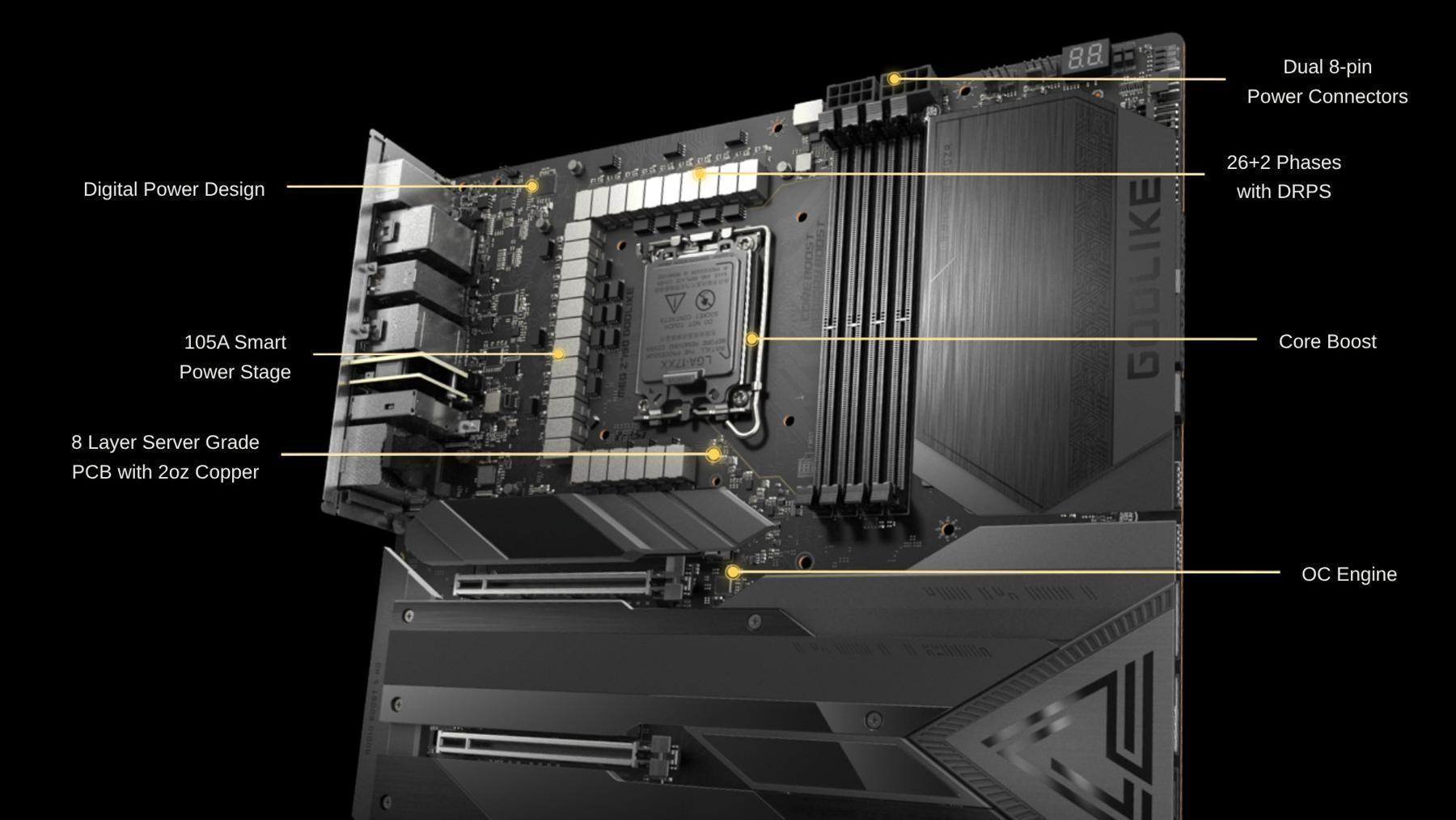
26+2 Phases With DPRS which is MSI’s “Duet Rail Power System” (DRPS) = marketing name for doubled phases.
Why they do this?
-
PWM controllers with more than 12–16 outputs are expensive and rare.
-
By using doublers, MSI can advertise big phase counts (“26+2”) while keeping costs under control.
-
The load per MOSFET is reduced, so thermal balance is excellent.
-
But the CPU still only “sees” 13 interleaved phases, not 26.
Let’s compare 13 true phases vs. 13 doubled into 26:
-
Effective switching frequency:
-
13 true @ 500 kHz → effective = 6.5 MHz
-
13 doubled @ 500 kHz → still effective = 6.5 MHz (not 13 MHz!)
-
-
Transient response:
-
True 26-phase would be ~2× faster and smoother
-
Doubled 26-phase is basically the same as 13-phase
-
-
Thermals & current capacity:
-
Excellent, because each 80–105 A Smart Power Stage carries less load
-
Can easily handle 600–1000 A, enough for any consumer CPU
-
So performance-wise:
-
It’s a monster VRM in terms of raw current and cooling
-
But it’s not as electrically precise as a true 26-phase design
In reality, this is 13 real phases doubled into 26, plus 2 more for SOC. While this does spread heat across more components and gives the board excellent thermal performance and huge current capacity, it doesn’t behave like a true 26-phase design. The CPU still sees the power delivery of a 13-phase VRM, just with lower heat per stage.
In other words: MSI’s high-end DRPS boards are extremely strong and easily handle flagship CPUs, but their “26 phases” are not the same as 26 true independent phases.
2.MAG B850 TOMAHAWK MAX WIFI
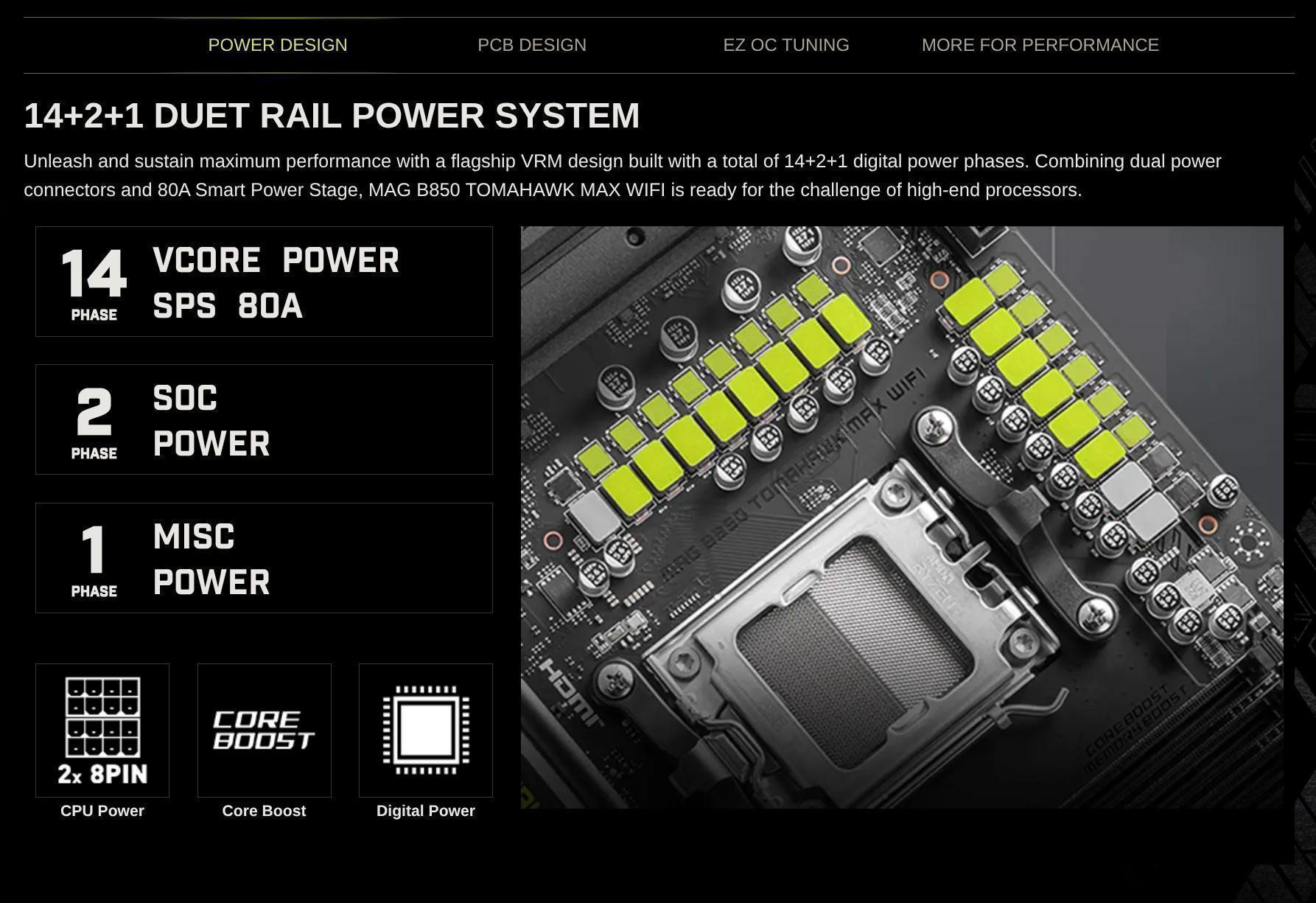
👉 In practice:
-
14 Vcore phases = 7 real PWM outputs × 2 (doubled).
-
The CPU sees the behavior of a 7-phase interleaved VRM, not a 14-phase true one.
The MSI MAG B850 Tomahawk MAX WIFI advertises a 14+2+1 VRM using MSI’s “Duet Rail Power System.” This means the 14 Vcore “phases” are actually 7 real phases doubled, each with 80 A Smart Power Stages.
This design offers very strong current capacity and good thermals, but since the phases are doubled, it doesn’t deliver the same transient response or ripple suppression as a motherboard with 14 true independent phases.
3. MSI PRO B840M-B
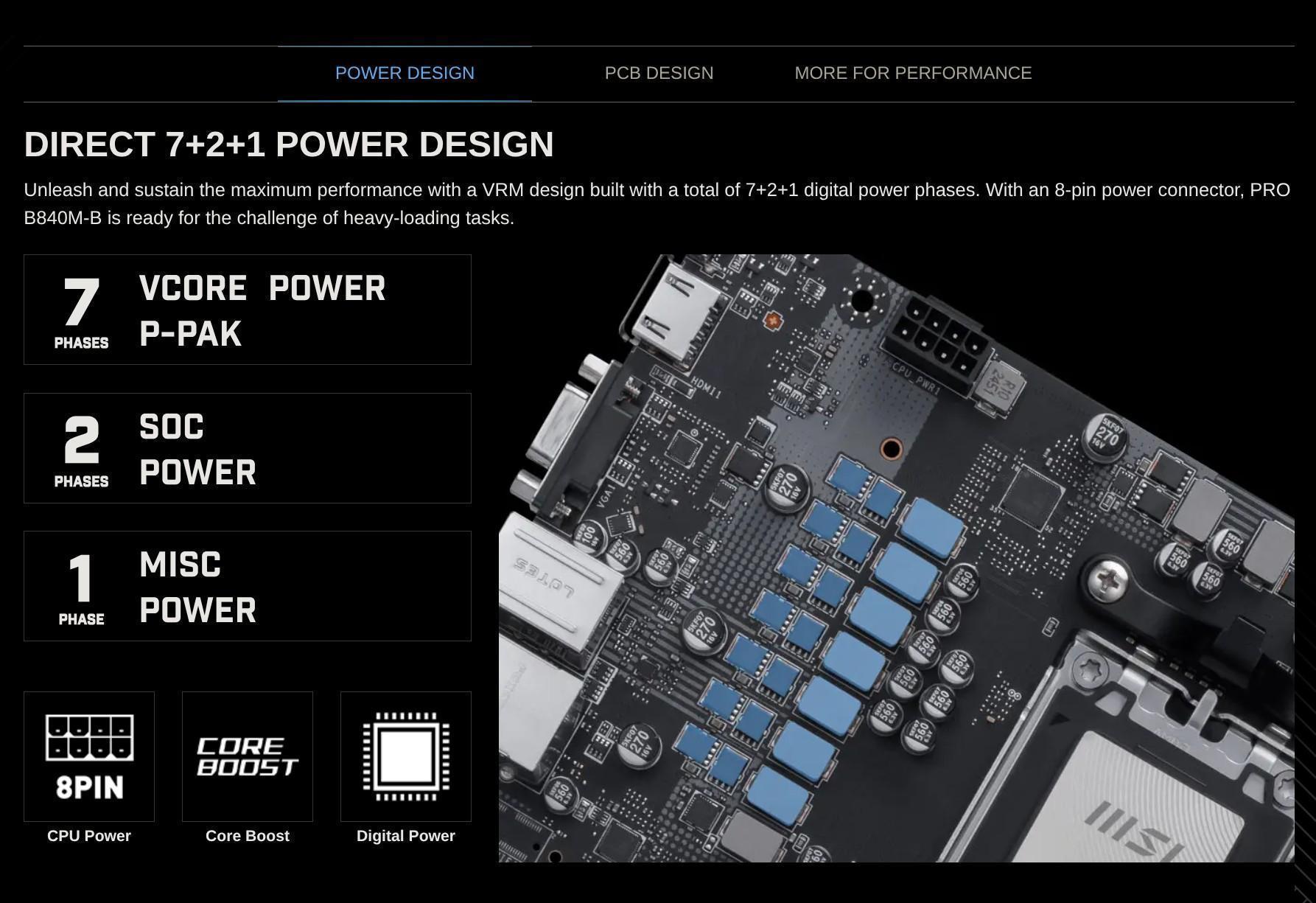
What the spec says
-
7+2+1 phases
-
7 phases → CPU Vcore
-
2 phases → SOC (iGPU / memory controller)
-
1 phase → auxiliary (PLL, misc)
-
-
Marketed as “Direct 7+2+1 Power Design.”
Why this one is “direct”
On entry-level and budget boards, manufacturers don’t use doublers. Why?
-
Cost reasons: doublers add complexity and aren’t needed since low-end CPUs don’t draw huge current.
-
Simpler PWM controllers (e.g. 4+2, 6+2, 8+2 outputs) can directly drive that many phases without splitting.
So in this case:
-
7 real Vcore phases → all independently controlled
-
No doublers → the name “Direct” is literal here
The MSI PRO B840M-B features a direct 7+2+1 power phase design, meaning there are 7 real phases for the CPU Vcore with no doublers. While this is much lower than the phase count on higher-end boards, the design is actually more “honest” — every phase is independent.
This provides solid stability for low TDP CPUs, but because the total current capacity is lower than premium boards, it’s not ideal for flagship processors or heavy overclocking.
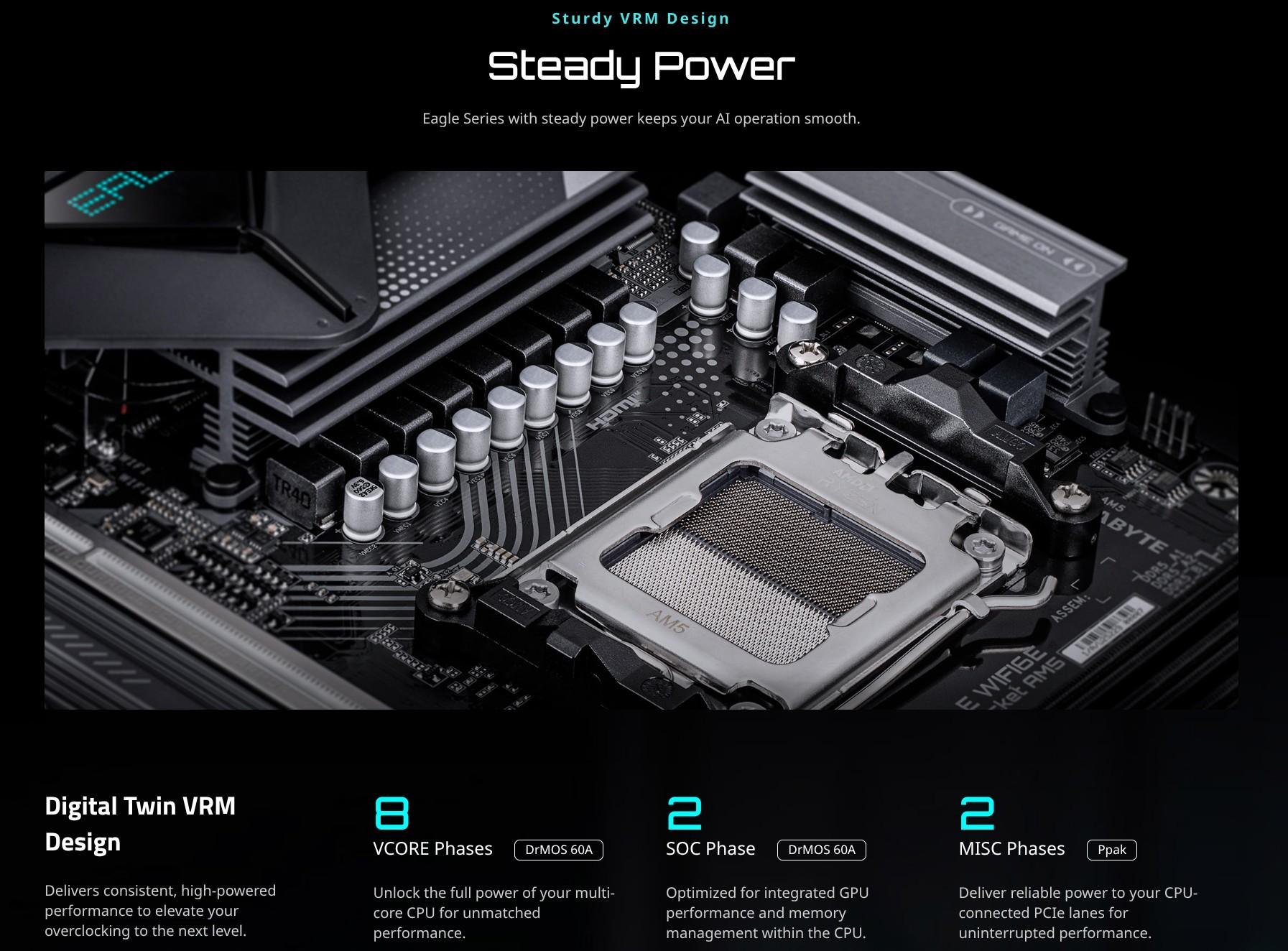
4. B850M EAGLE WIFI6E
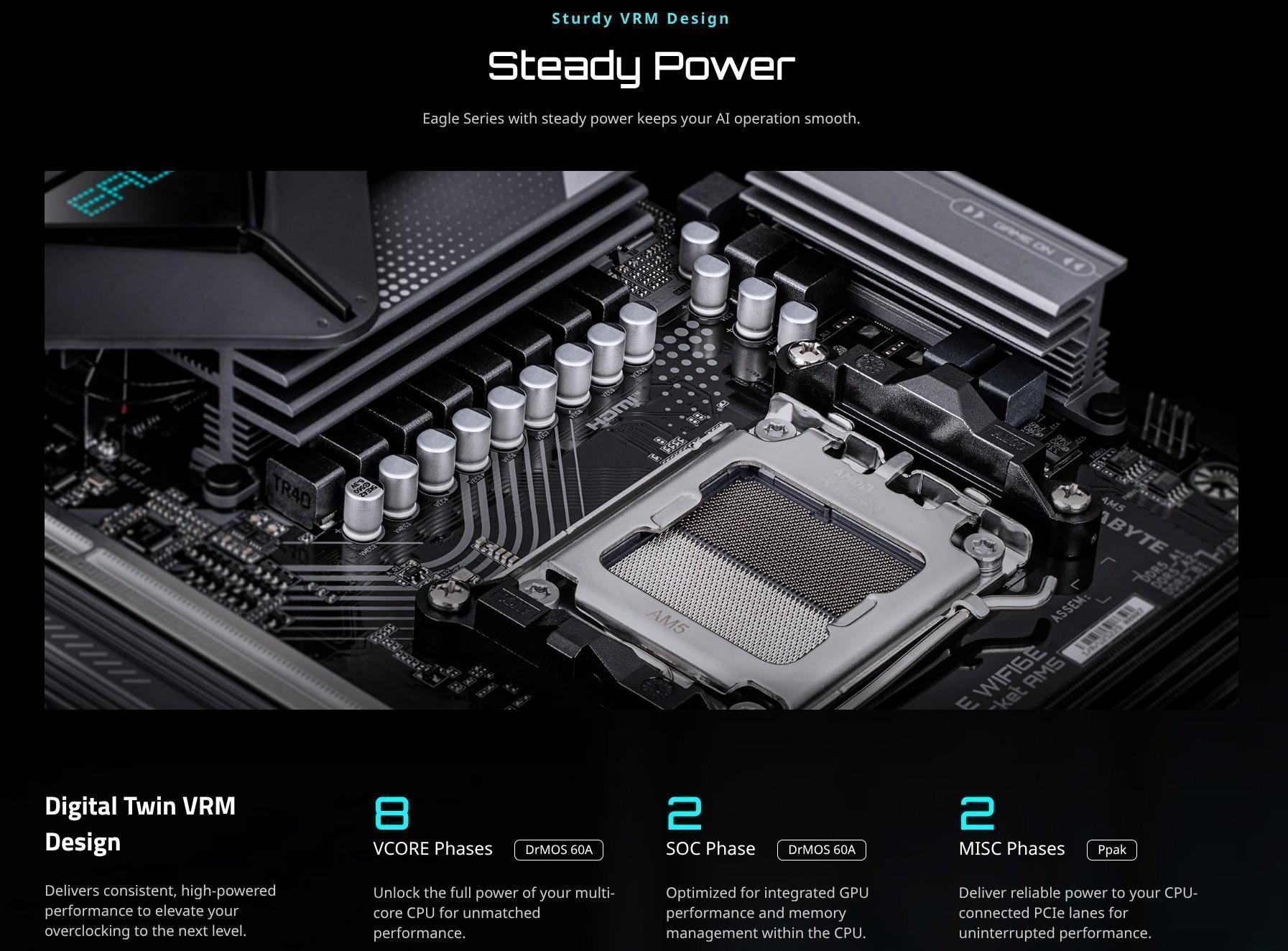
What Gigabyte is claiming?
They advertise:
-
8 Vcore phases DrMOS 60 A
-
2 SOC phases DrMOS 60 A
-
2 Misc phases (Ppak MOSFETs)
So it looks like 8+2+2 = 12 phases total.
The hidden detail — “4+4 phases parallel power design”
This is the giveaway.
-
“4+4 parallel” = 4 real PWM outputs, each output feeding two DrMOS power stages in parallel.
-
That means there are 8 physical power stages, but they’re grouped in pairs, switching at the same time.
👉 Effectively, this is 4 real phases × 2 parallel power stages.
MSI vs. Gigabyte at the Entry Level
When looking at budget motherboards, it’s important to understand how the VRM phases are really implemented.
-
MSI (Direct Power Design):
On many entry-level MSI boards, the advertised “7+2+1” or similar actually means 7 true Vcore phases. This is a simpler but more transparent design — every phase is independent, with no doublers or parallel stages. The total capacity is limited, but the power delivery is clean and honest. -
Gigabyte (Digital Twin VRM):
Gigabyte often advertises “8 phases” using their Digital Twin system. In reality, this is usually 4 real phases with 2 power stages each in parallel. While this spreads the heat across more components, electrically it behaves like a 4-phase VRM — not a true 8-phase. The result is weaker transient response and less precise power delivery compared to MSI’s direct designs.
Bottom line: At the entry level, MSI’s VRMs are often technically better than Gigabyte’s, because they use real independent phases instead of inflating the numbers with parallel stages.
Conclusion
1. ASUS — True Phases
ASUS, especially their ROG, TUF and ProArt boards, often uses true independent phases. They invest in PWM controllers with enough outputs to drive each Vcore phase individually, without relying on doublers.
-
Advantages:
-
Clean, stable power delivery
-
Excellent transient response
-
Lower voltage ripple
-
High overclocking headroom
-
-
VRM score impact: These boards get a boost in quality scoring because the power is more precise, even if the advertised phase count is lower than competitors.
Summary: ASUS sits at the top in terms of VRM quality and electrical precision.
2. MSI — Strong, Honest Designs
-
High-end boards (Tomahawk, MEG, ACE): use Duet Rail Power System (DRPS), where the advertised phase count is doubled, not fully independent. Excellent thermal performance and current capacity, but less precise than true phases.
-
Entry-level boards (PRO B-series, lower-end B/H boards): often use direct/true phases, e.g., 6–8 Vcore phases with no doubling. Clean and honest, but limited in total power.
Summary: MSI’s VRMs are strong, with high-end designs slightly behind ASUS in electrical precision, but their entry-level boards are often superior to competitors in real-phase implementation.
3. Gigabyte — Marketing Numbers vs. Reality
-
Uses Digital Twin VRM or “parallel power stage” designs.
-
For mid-range and entry-level boards, advertised phases are often parallel/doubled, not fully independent.
-
Example: “8 Vcore phases” = 4 real phases × 2 in parallel
-
-
Advantages: Excellent heat spreading, very high current capacity
-
Disadvantages: Weaker transient response and voltage ripple compared to true-phase designs
Summary: Gigabyte boards can appear strong on paper, but at lower tiers their VRMs are often less electrically precise than MSI’s direct-phase boards.
4. ASRock — Typically at the Bottom of the Stack
-
Many ASRock boards, even mid-range, rely heavily on doubled phases or basic DrMOS designs.
-
Entry-level boards often have fewer total phases, and the phases may be lower-rated MOSFETs.
-
While they are adequate for everyday use, they generally offer the lowest VRM quality among the major manufacturers, especially for overclocking or heavy CPU loads.
Summary: ASRock VRMs are functional, but in terms of electrical precision, thermal management, and transient response, they usually sit below ASUS, MSI, and Gigabyte.
How We Calculate Motherboard VRM Quality
Motherboard VRMs (Voltage Regulator Modules) are a critical component for CPU stability, power delivery, and overclocking potential. To help our users understand the quality of VRMs, we use a formula that considers the number of power phases, amperage per phase, and the manufacturer-specific implementation (true phases vs. doubled/parallel phases).
Here’s a breakdown of what the code does and why:
Step 1: Base VRM Score
if motherboard.cpu_power_phases and motherboard.amperage_rating:
derate = 0.75 # Accounts for efficiency losses in the VRM
alpha = 1.12 # Nonlinear scaling for phase count (more phases = disproportionately better)
beta = 0.95 # Nonlinear scaling for amperage per phase
K = 17.0 # Normalization constant to bring raw scores into a reasonable range
phases = float(motherboard.cpu_power_phases)
amp = float(motherboard.amperage_rating)
raw = derate * (phases ** alpha) * (amp ** beta) / K
vrm_quality = raw
print("VRM Score Raw: ", vrm_quality)
else:
vrm_quality = 10 # Fallback score if motherboard specs are missing
Explanation:
-
phases= number of Vcore phases on the motherboard. -
amp= amperage rating of each phase. -
deratereduces the raw score to account for real-world efficiency losses. -
alphaandbetaslightly favor higher phase counts and stronger power stages in a nonlinear way. -
Kensures the raw score is scaled to a reasonable range. -
If specs are missing, we give a low default score of 10.
Step 2: Manufacturer Adjustments
Different motherboard manufacturers implement VRMs differently:
-
ASUS often uses true independent phases, giving cleaner and faster power delivery.
-
MSI, Gigabyte, ASRock often use doubled or parallel phases, which spread heat across components but are slightly less precise.
We adjust the raw VRM score based on manufacturer and the raw score tier:
man = motherboard.manufacturer.lower()
if man == "asus":
if vrm_quality >= 70:
vrm_quality *= 1.05
elif vrm_quality >= 40:
vrm_quality *= 1.1
elif vrm_quality >= 25:
vrm_quality *= 1.1
else:
vrm_quality *= 1.15
elif man == "msi":
if vrm_quality >= 70:
vrm_quality *= 1
elif vrm_quality >= 40:
vrm_quality *= 1
elif vrm_quality >= 25:
vrm_quality *= 1.05
else:
vrm_quality *= 1.15
elif man == "gigabyte":
if vrm_quality >= 70:
vrm_quality *= 1
elif vrm_quality >= 40:
vrm_quality *= 1
elif vrm_quality >= 25:
vrm_quality *= 1.05
else:
vrm_quality *= 1.10
elif man == "asrock":
if vrm_quality >= 70:
vrm_quality *= 1
elif vrm_quality >= 40:
vrm_quality *= 1
elif vrm_quality >= 25:
vrm_quality *= 1.05
else:
vrm_quality *= 1.10
vrm_quality = int(round(min(vrm_quality, 110)))
Explanation:
-
The multipliers reflect manufacturer VRM quality.
-
ASUS boards get a bonus for cleaner true-phase designs.
-
MSI entry-level boards get a small boost if low-tier.
-
Gigabyte and ASRock get slight adjustments for parallel/doubled phases.
-
This ensures that the VRM score reflects both electrical performance and real-world design quality.
Scores are capped at 110 to allow a small bonus above “perfect” 100 for top-tier boards.
-
Rounded to the nearest integer for display.
Comments
0 comments on this article.
Log in to leave a comment.
Log inNo comments yet.