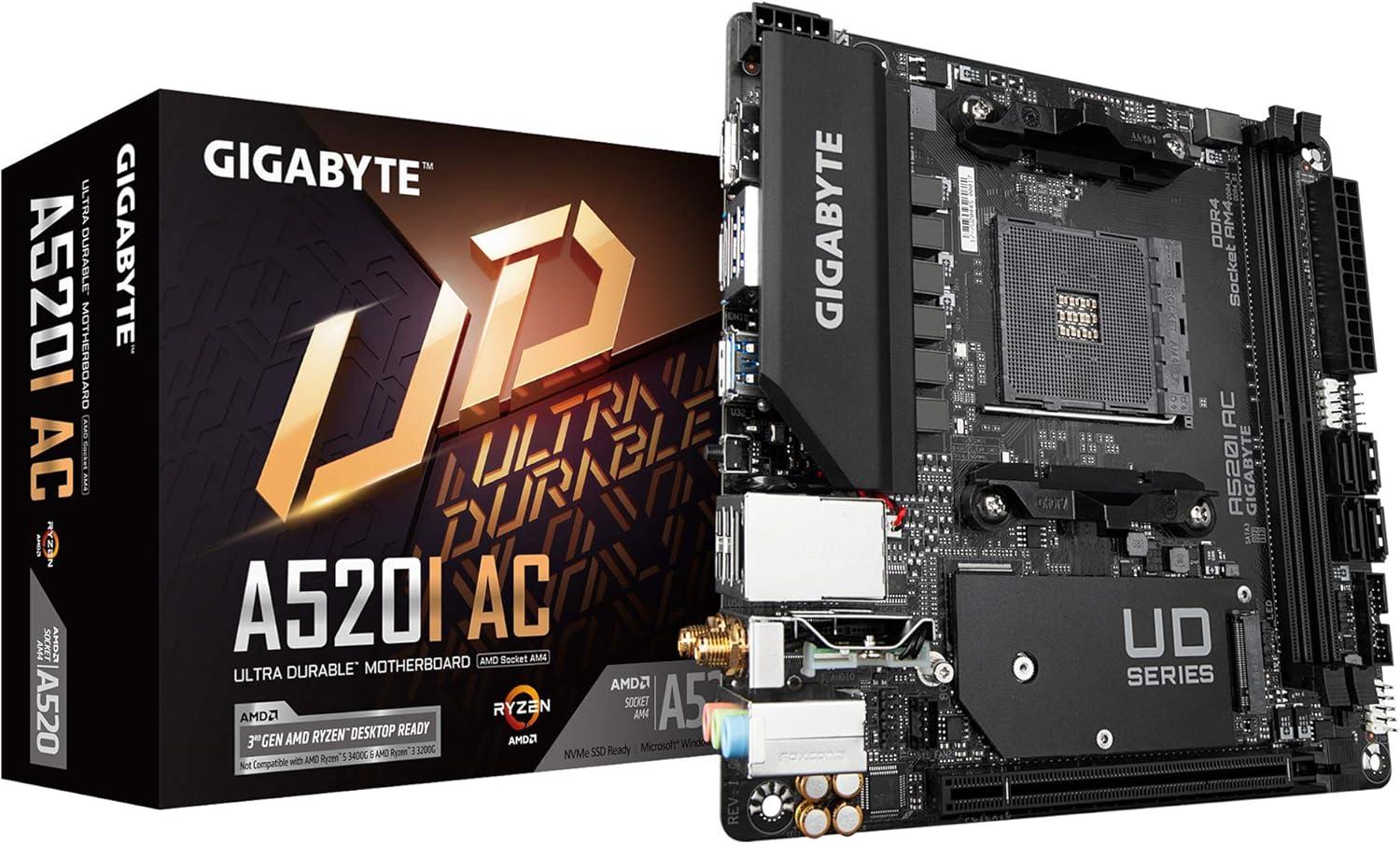
Gigabyte A520I AC
Gigabyte A520I AC Specifications Review
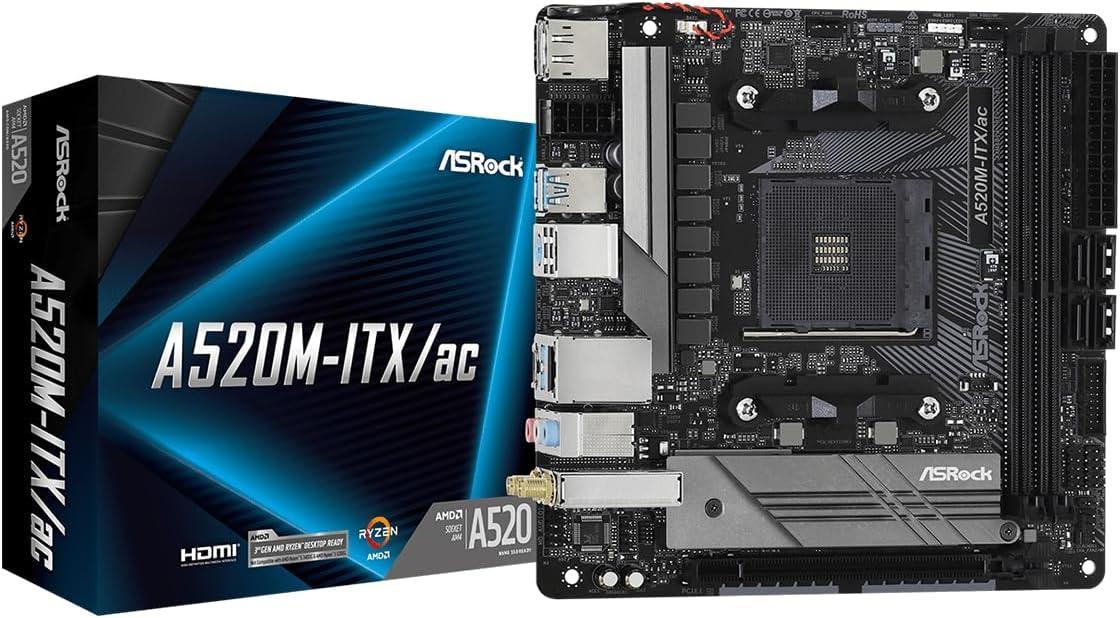
Gigabyte A520I AC by GIGABYTE is a Mini-ITX form factor motherboard based on the entry-level A520I chipset and AM4 socket, with basic features and limited connectivity. It is designed to support DDR4 memory, with 2 slots, a maximum capacity of 64 GB, and an overclocking speed of up to 5300 MHz. It features channels, a voltage of V and supports Error-Correcting Code (ECC) memory.
VRM Quality
The Gigabyte A520I AC has a basic VRM configuration, delivering 50 A across 6 phases. Best for low-power CPUs (≤65 W TDP). Using high-wattage chips or overclocking could cause severe thermal issues and instability. Recommended for budget builds, office workstations, and media PCs.
See the VRM Appropriate CPU Specification Table at the bottom of this page for recommended CPU options.
Expansion and Storage Overview
The Gigabyte A520I AC offers a simplified expansion and storage configuration with PCIe 3.0 support, meaning it uses PCI Express 3.0, still capable for most current GPUs and expansion cards, but with less bandwidth than newer standards. It also includes 1 x16 slot . These PCIe slots are used to connect expansion cards — with the x16 slots typically reserved for graphics cards, while x8, x4, and x1 slots are used for devices like capture cards, sound cards, or network adapters.
For storage, this motherboard provides 1 M.2 slot (x4/x2) and 4 SATA ports. M.2 slots are high-speed connectors for modern NVMe SSDs, which are much faster than older storage, while SATA ports are used for traditional hard drives and 2.5-inch SSDs. Together, they allow you to mix fast primary storage with larger, more affordable drives for bulk data.
Connectivity Overview
This motherboard has essential connectivity features with wired Realtek® GbE LAN chip Ethernet wireless networking with the Wi-Fi 802.11ac standard, Bluetooth 4.2 is included for wireless peripherals. USB connectivity covers basic needs. Please refer to the specification table for details.
For video output, this motherboard includes HDMI version 2.1 , DisplayPort version 1.4 . These video outputs are intended for integrated graphics and will only function if your CPU includes integrated GPU capabilities.
Audio Quality
The motherboard includes a standard audio chipset (Realtek® Audio CODEC) that covers basic needs for casual listening. While adequate for everyday use with mainstream headphones or desktop speakers, discerning users may want to add a USB DAC or sound card for improved fidelity, especially for music production or high-end headphones.
Overall Quality and Value
Gigabyte A520I AC is minimalist and barebones, with a low overall quality score of 32.40. It is suitable only for very basic computing needs or legacy systems where performance, connectivity, and features are limited, best reserved for simple, low-demand environments.
This motherboard has a solid 48.6% value efficiency, providing decent performance relative to its price. It represents a balanced option for users seeking fair capabilities without paying a premium.
General Information
| Manufacturer | GIGABYTE |
|---|---|
| Motherboard Name | Gigabyte A520I AC |
| Current Price Amazon | $127 |
| Amazon Price Updated | 8 hours, 33 minutes ago. |
| Motherboard Available | True |
| Chipset / Socket | A520I / AM4 |
| Form Factor | Mini-ITX |
VRM Configuration
| CPU Power Phases (Amps) | 6 (50 A) |
|---|---|
| Power Design | 6+1 |
Memory Information
| Type / Slots | DDR4 / 2 slots |
|---|---|
| Max Capacity / Max OC | 64 GB / 5300 MHz |
| ECC Support | ✔️ ECC (Error-Correcting Code) Supported |
PCIe Slot Configuration
| Supported Version | PCIe 3.0 | ||||
|---|---|---|---|---|---|
| Slot Size | Physical Slots | Gen3 |
|---|---|---|
| x16 | 1 | 1 |
Storage Configuration
| M.2 Slot Count | 1 slot |
|---|---|
| M.2 Supported Lengths | 2260, 2280 |
| M.2 PCIe Modes | x4/x2 |
| SATA Ports | 4 |
Onboard Audio Features
| Audio Chipset | Realtek® Audio CODEC |
|---|---|
| Analog Audio Jacks | 3 jacks |
| Spatial/Surround Audio | ✔️ Rear Output Supports Spatial Audio |
Motherboard Display Outputs
| HDMI Output | HDMI - Version 2.1 (Max: 4096x2160@60 Hz) |
|---|---|
| DisplayPort Output | DisplayPort - Version 1.4 (Max: 5120x2880@60 Hz) |
USB and Thunderbolt Connectivity
Rear USB Ports
| USB 2.0 Type-A (480 Mbps) | 2 |
|---|---|
| USB 3.2 Gen 1 Type-A (5 Gbps) | 4 |
Internal USB Headers
| USB 2.0 Header (480 Mbps) | 2 |
|---|---|
| USB 3.2 Gen 1 Header (5 Gbps) | 2 |
Networking Information
| Ethernet | Chipset: Realtek® GbE LAN chip LAN Ports: 1 |
|---|---|
| Wi-Fi |
Version: Wi-Fi 802.11ac Frequency Bands: 2.4 GHz, 5 GHz Antenna Connectors: 2 |
| Bluetooth |
Version: 4.2 |
Button Features
| Buttons |
Q-Flash Plus |
|---|
Quality & Features
Additional Information
| RAM | Supports DDR4 memory modules with speeds of 5300(O.C.) down to 2133 MHz. Supports both ECC Un-buffered DIMM 1Rx8/2Rx8 and non-ECC Un-buffered DIMM 1Rx8/2Rx8/1Rx16 modules. ECC memory (ECC mode) support varies by CPU. |
|---|---|
| Display | Integrated Graphics Processor with AMD Radeon™ Graphics support. There are 2 HDMI ports and 1 DisplayPort port. Both DisplayPort and HDMI support HDCP 2.3 and HDR. Supports up to 3 displays at the same time. Maximum shared memory of 16 GB. |
| Expansion | The PCI Express x16 slot is integrated in the CPU. |
| Storage |
M.2 Slot Details:
The M.2 connector is a Socket 3, M key type. The SATA connectors are 6Gb/s. |
| Audio | High Definition Audio. 2/4/5.1/7.1-channel support. To configure 7.1-channel audio, you need to open the audio software and select Device advanced settings > Playback Device to change the default setting first. |
| Networking | Different Wi-Fi modules depending on PCB revision: Intel® Wi-Fi AC 3168 (For PCB rev. 1.0/1.2/1.3)/Intel® Wi-Fi AC 9260 (For PCB rev. 1.1)/ Realtek® Wi-Fi AzureWave Wi-Fi AW-CB304NF (Realtek® RTL8821CE) (For PCB rev. 1.4). Actual data rate may vary depending on environment and equipment. |
| Buttons | The board includes a Clear CMOS jumper. |
| Dimensions | 17 cm x 17 cm |
Note: The specifications and descriptions above are extracted by AI to present the official manufacturer data in a clearer and more natural way for easier understanding. However, this AI-processed information may contain inaccuracies. Please verify all details by consulting the official manufacturer's information provided below.
Gigabyte A520I AC Compared to Motherboards with Similar Performance and Features
Motherboard Quality & Features per Price Table
| Motherboard (Desc) | Price (Desc) | Overall_Q (Desc) | VRM_Q (Desc) | Chipset (Desc) | Exp_Str (Desc) | Connect (Desc) | Audio (Desc) | Q&F/Price (Desc) |
|---|---|---|---|---|---|---|---|---|
|
$80❗
|
↓
-1.4%
|
38.0%
|
13.0%
|
58.0%
|
37.0%
|
37.0%
|
45.0%
|
90.7%
|
|
|
$188❗
|
0.0%
|
37.8%
|
14.0%
|
77.0%
|
45.0%
|
13.0%
|
40.0%
|
38.2%
|
|
|
$100
|
0.0%
|
36.2%
|
18.0%
|
49.0%
|
35.0%
|
39.0%
|
40.0%
|
68.8%
|
|
|
$72
|
0.0%
|
33.8%
|
12.0%
|
58.0%
|
30.0%
|
29.0%
|
40.0%
|
89.2%
|
|
|
$146
|
↑
38.8%
|
33.0%
|
24.0%
|
41.0%
|
29.0%
|
31.0%
|
40.0%
|
43.0%
|
|
|
$127
|
↑
0.1%
|
32.4%
|
15.0%
|
47.0%
|
29.0%
|
31.0%
|
40.0%
|
48.6%
|
|
|
$64
|
0.0%
|
31.0%
|
12.0%
|
37.0%
|
32.0%
|
29.0%
|
45.0%
|
92.1%
|
|
|
$64
|
↑
0.8%
|
30.4%
|
13.0%
|
38.0%
|
27.0%
|
29.0%
|
45.0%
|
89.6%
|
|
|
$70
|
↑
2.2%
|
28.2%
|
9.0%
|
36.0%
|
27.0%
|
29.0%
|
40.0%
|
76.6%
|
Motherboard Comparison and Detail Specifications Table
| Specification | Perf Chart | ||||||||||||||||||||||||||||||||||||||||||||
|---|---|---|---|---|---|---|---|---|---|---|---|---|---|---|---|---|---|---|---|---|---|---|---|---|---|---|---|---|---|---|---|---|---|---|---|---|---|---|---|---|---|---|---|---|---|
| Price |
$80❗
|
↓
-1.4%
|
$188❗
|
0.0%
|
$100
|
0.0%
|
$72
|
0.0%
|
$146
|
↑
38.8%
|
$127
|
↑
0.1%
|
$64
|
0.0%
|
$64
|
↑
0.8%
|
$70
|
↑
2.2%
|
||||||||||||||||||||||||||||||||||||
| Manufacturer | ASRock | MSI | ASUS | Asrock | ASRock | GIGABYTE | GIGABYTE | MSI | ASRock | ||||||||||||||||||||||||||||||||||||
| Chip/Socket | B450M / AM4 | B550 / AM4 | A520M / AM4 | B450M / AM4 | A520M / AM4 | A520I / AM4 | A520M / AM4 | A520M / AM4 | A520M / AM4 | ||||||||||||||||||||||||||||||||||||
| Form | Micro-ATX | Standard-ATX | Micro-ATX | Micro-ATX | Mini-ITX | Mini-ITX | Micro-ATX | Micro-ATX | Micro-ATX | ||||||||||||||||||||||||||||||||||||
| CPU Phases | 6 (42 A) | 5 (55 A) | 6 (60 A) | 5 (50 A) | 8 (60 A) | 6 (50 A) | 5 (50 A) | 5 (50 A) | 4 (50 A) | ||||||||||||||||||||||||||||||||||||
| PWR Design | 6+2 | 5+1 | 6+1 | 5+1 | 8+1 | 6+1 | 5+1 | 5+1 | 4+2 | ||||||||||||||||||||||||||||||||||||
| Mem Slots | 4 / DDR4 | 4 / DDR4 | 4 / DDR4 | 2 / DDR4 | 2 / DDR4 | 2 / DDR4 | 2 / DDR4 | 2 / DDR4 | 2 / DDR4 | ||||||||||||||||||||||||||||||||||||
| Max Mem | 128 GB / 3200 MHz | 128 GB / 4400 MHz | 128 GB / 4866 MHz | 64 GB / 3200 MHz | 64 GB / 4733 MHz | 64 GB / 5300 MHz | 64 GB / 5100 MHz | 64 GB / 4600 MHz | 64 GB / 4733 MHz | ||||||||||||||||||||||||||||||||||||
| PCIe | PCIe 3.0 | PCIe 3.0 | PCIe 3.0 | PCIe 3.0 | PCIe 3.0 | PCIe 3.0 | PCIe 3.0 | PCIe 3.0 | PCIe 3.0 | ||||||||||||||||||||||||||||||||||||
| PCIe Slots | 1x16 Gen3 | 1x1 | 2x16 Gen3 | 4x1 | 1x16 Gen3 | 2x1 Gen3 | 1x16 Gen3 | 1x1 | 1x16 Gen3 | 1x16 Gen3 | 1x16 Gen3 | 1x1 Gen3 | 1x16 Gen3 | 1x1 Gen3 | 1x16 Gen3 | 1x1 Gen3 | ||||||||||||||||||||||||||||||||||||
| M.2 | 2 | 1 | 1 | 1 | 1 | 1 | 1 | 1 | 1 | ||||||||||||||||||||||||||||||||||||
| SATA | 4 | 6 | 4 | 4 | 4 | 4 | 4 | 4 | 4 | ||||||||||||||||||||||||||||||||||||
| Audio | Realtek ALC892/897 Audio Codec | Realtek® ALC897 Codec | Realtek ALC887/897 | Realtek ALC887/897 | Realtek ALC887/897 Audio Codec | Realtek® Audio CODEC | Realtek® ALC892/ALC897 | Realtek® ALC892/ALC897 Codec | Realtek ALC887/897 Audio Codec | ||||||||||||||||||||||||||||||||||||
| S/PDIF | ❌ | ❌ | ❌ | ❌ | ❌ | ❌ | ❌ | ❌ | ❌ | ||||||||||||||||||||||||||||||||||||
| HDMI | ✔️ (1.4) | ✔️ (2.0b) | ✔️ (2.1) | ✔️ (None) | ✔️ (2.1) | ✔️ (2.1) | ✔️ (2.1) | ✔️ (2.1) | ✔️ (2.1) | ||||||||||||||||||||||||||||||||||||
| DP | ❌ | ❌ | ✔️ (1.2) | ❌ | ✔️ (1.4) | ✔️ (1.4) | ❌ | ❌ | ❌ | ||||||||||||||||||||||||||||||||||||
| LAN | PCIE x1 Gigabit LAN 10/1… (1 ports) | 1x Realtek® RTL8111H LAN… (1 ports) | 1 x Realtek 1Gb Ethernet… (1 ports) | PCIE x1 Gigabit LAN 10/1… (1 ports) | PCIE x1 Gigabit LAN 10/1… (1 ports) | Realtek® GbE LAN chip (1 ports) | Realtek® GbE LAN chip (1… (1 ports) | 1x Realtek® RTL8111H Gig… (1 ports) | PCIE x1 Gigabit LAN 10/1… (1 ports) | ||||||||||||||||||||||||||||||||||||
| Wi-Fi | ❌ | ❌ | Wi-Fi Wi-Fi 5 | ❌ | Wi-Fi 802.11ac | Wi-Fi 802.11ac | ❌ | ❌ | ❌ | ||||||||||||||||||||||||||||||||||||
| BT | ❌ | ❌ | v5.0 | ❌ | v4.2 | v4.2 | ❌ | ❌ | ❌ | Rear USB |
|
❌ |
|
|
|
|
|
|
|
||||||||||||||||||||||||||
| USB Headers |
|
|
|
|
|
|
|
|
|
||||||||||||||||||||||||||||||||||||
| Front USB |
❌ |
❌ |
❌ |
❌ |
❌ |
❌ |
❌ |
❌ |
❌ |
VRM Appropriate CPU Specification Table
| CPU | Price | App_Performance | Game_Performance | TDP/Max | C/SC/T | L2/L3 Cache | Base/Boost | Code Name | GPU |
|---|---|---|---|---|---|---|---|---|---|
| No compatible CPU available. The motherboard's VRM is too weak to be recommended with any CPU in the database. | |||||||||
Official Manufacturer Data
Memory:
Support for DDR4 5300(O.C.) / 5200(O.C.) / 5100(O.C.) / 4800(O.C.) / 4600(O.C.) / 4400(O.C.) / 4266(O.C.) / 4133(O.C.) / 4000(O.C.) / 3866(O.C.) / 3733(O.C.) / 3600(O.C.) / 3466(O.C) / 3400(O.C.) / 3200 / 2933 / 2667 / 2400 / 2133 MHz memory modules
Dual channel memory architecture
Support for ECC Un-buffered DIMM 1Rx8/2Rx8 memory modules*
* ECC memory (ECC mode) support varies by CPU
Support for non-ECC Un-buffered DIMM 1Rx8/2Rx8/1Rx16 memory modules
Support for Extreme Memory Profile (XMP) memory modules
Graphics:
1 x DisplayPort port, supporting a maximum resolution of 5120x2880@60 Hz
* Support for DisplayPort 1.4 version, HDCP 2.3, and HDR.
2 x HDMI ports, supporting a maximum resolution of 4096x2160@60 Hz
* Support for HDMI 2.1 version, HDCP 2.3, and HDR.
Support for up to 3 displays at the same time
Maximum shared memory of 16 GB
Storage:
1 x M.2 connector (Socket 3, M key, type 2260/2280 SATA and PCIe 3.0 x4/x2 SSD support)
Chipset:
4 x SATA 6Gb/s connectors
Support for RAID 0, RAID 1, and RAID 10
Expansion Slots:
1 x PCI Express x16 slot, supporting PCIe 3.0 and running at x16
USB:
4 x USB 3.2 Gen 1 ports on the back panel
Chipset:
2 x USB 3.2 Gen 1 ports available through the internal USB header
4 x USB 2.0/1.1 ports (2 ports on the back panel, 2 ports available through the internal USB header)
Internal I/O:
1 x 8-pin ATX 12V power connector
1 x CPU fan header
2 x system fan headers
1 x addressable LED strip header
1 x RGB LED strip header
1 x M.2 Socket 3 connector
4 x SATA 6Gb/s connectors
1 x front panel header
1 x front panel audio header
1 x speaker header
1 x USB 3.2 Gen 1 header
1 x USB 2.0/1.1 header
1 x Trusted Platform Module (TPM) header (2x6 pin, for the GC-TPM2.0_S module only)
1 x serial port header
1 x Clear CMOS jumper
*All fan headers are subject to support AIO_Pump, Pump and high performance fan with the capability of delivering up to 2A/12V @ 24W.
Back Panel I/O:
2 x HDMI ports
4 x USB 3.2 Gen 1 ports
2 x USB 2.0/1.1 ports
1 x Q-Flash Plus button
1 x RJ-45 ports
2 x SMA antenna connectors (1T1R)
3 x audio jacks
WiFi:
WIFI 802.11a/b/g/n/ac, supporting 2.4/5 GHz Dual-Band
BLUETOOTH 4.2
Support for 11ac wireless standard
* Actual data rate may vary depending on environment and equipment.
Audio:
High Definition Audio
2/4/5.1/7.1-channel
* To configure 7.1-channel audio, you need to open the audio software and select Device advanced settings > Playback Device to change the default setting first. Please visit GIGABYTE's website for details on configuring the audio software.
Special Features:
* Available applications in APP Center may vary by motherboard model. Supported functions of each application may also vary depending on motherboard specifications.
@BIOS
EasyTune
RGB Fusion
Smart Backup
System Information Viewer
Support for Q-Flash Plus
Support for Q-Flash
Add Comment on Gigabyte A520I AC